Hey everyone, it’s Jake here—founder of a small USB cable company that’s been making charging cords for phones, laptops, and everything in between for 7 years. I get this question literally every week from customers, friends, even my cousin who still uses a flip phone from 2018: “Will any USB cable work for charging?” And for a long time, I used to shrug it off and say “yeah, probably,” but I recently dug into the engineering behind it because last quarter we had a batch of customer complaints where their cheap no-name cords wouldn’t charge their new iPhone 15. That stuff stuck with me, so let’s break this down like we’re grabbing coffee and geeking out over tech. USB Cable
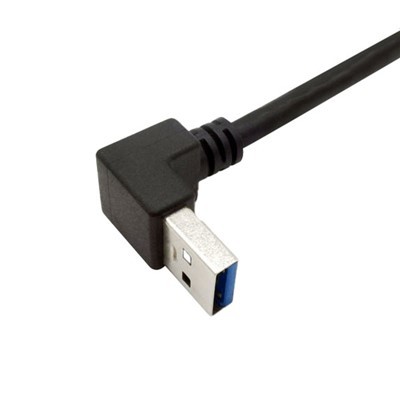
First off, let’s start with the basics. USB stands for Universal Serial Bus, right? The “universal” part makes it sound like it all works the same, but that’s where the confusion starts. USB cables aren’t one-size-fits-all—they’re built for two main jobs: transferring data, and carrying power. Some cables are only made for data (you know, the ones that come with your portable hard drive), and some are only for charging. Wait, no, actually, most charging-only cables skip the data pins entirely to cut costs. But that’s just the tip of the iceberg. You’ve got different generations of USB too: USB-A, USB-B, USB-C, Micro-USB. USB-C is the big new one, but even USB-C cables aren’t all the same. I’ve seen cheap USB-C cords that can only do 5W charging—same as the old iPhone chargers—while our premium ones do 100W, which can charge a 16-inch laptop in like an hour. So if you plug a 100W cord into a device that needs 60W, it’ll work, but if you plug a 5W cord into a device that needs 65W, that’s where problems happen.
Let’s talk about charging speed, because that’s what most people care about these days. Modern devices use what’s called “fast charging protocols”—like Power Delivery (PD), Quick Charge, or PPS. For these to work, the cable has to support those protocols, and more importantly, it has to carry enough power. That means the cable’s wires—specifically the gauge (thickness) of the copper inside—matter a lot. Cheap no-name cables often use thin copper, even below what’s allowed by USB standards, to save a few cents. I tested a random Amazon “fast charging” cable last month that claimed to do 60W, but when I measured the voltage drop, it was so bad that it only delivered 32W. That means it would take twice as long to charge, and some devices would just refuse to charge at all because the voltage was too low. We had a customer last week say their new Samsung S23 wouldn’t charge from their old laptop’s USB port—turns out, their old cable was too thin, so the port’s smart charging feature shut it off to prevent damage.
Wait, what about when a cable says it’s “universal”? Let’s clarify that. A universal cable might work for your old phone, your Bluetooth speaker, and your tablet, but if you have a new laptop that needs 65W, or a 4K external monitor that needs 90W to charge and display, that “universal” cable might cut out. I’ve seen people use a USB-A to USB-C cable (the kind that comes with an old phone) to charge their new MacBook Air—and it just doesn’t work, because that cable only supports USB 2.0, which can only carry up to 2.5A, or 12.5W. That’s basically slow charging for a phone, useless for a laptop.
Another thing: cable length. I know, I know, longer cables are super convenient for bed or the couch. But the longer the cable, the more resistance there is in the wires, which means more voltage drop. So a 6-inch cable that does 100W will only do 80W if it’s 10 feet long, and maybe 50W if it’s 20 feet long. That’s why we don’t make 25-foot charging-only cables—they’d be too inefficient. We do have 10-foot premium USB-C cables that do 100W, because we use thicker copper to compensate. Cheap brands will make 25-foot cables anyway, but you end up with something that can barely charge a phone, let alone a laptop.
What about safety? This is the part that I get most passionate about. A lot of people think “it’s just a cable, what’s the worst that can happen?” But bad cables can be dangerous. I’ve heard stories of cables overheating and melting, even starting small fires, because they use thin copper or no insulation around the wires. The USB standards set by the USB Implementers Forum (USB-IF) require that cables meet certain specs for current, voltage, and heat resistance. Cheap no-name cables often skip that testing to save money. At our company, every single cable we make gets tested for 10 minutes of continuous high-power charging before it leaves our warehouse—no exceptions. We don’t cut corners on that, because my little cousin uses our cables for his gaming setup, and I want him to be safe.
Wait, but let’s not write off all cheap cables entirely. A $2 cable from a reputable brand (not a random no-name on Amazon) will probably work for basic charging—like your old iPhone SE or a Bluetooth speaker that only needs 5W. The problem is the no-name ones that list “60W” or “100W” on the packaging but don’t actually meet USB-IF standards. I’ve tested dozens of those: some have wires that are so thin, you can barely see the copper when you strip the outer jacket, and some have fake USB-C connectors that aren’t even fully compliant. Last year, we got a pallet of “fast charging” USB-C cords from a supplier that turned out to have 20% failure rates within a month—we sold a few, but had to issue full refunds, which cost us more than we made on that batch. That’s when I knew we needed to cut ties with any supplier that didn’t follow the rules.
Let’s also talk about device compatibility, because it’s not just the cable. Your device’s charging circuit is what decides how much power it needs. If you have a Google Pixel that uses PPS fast charging, it needs a cable that supports PPS to get the full 30W. If you use a cable that only supports 5W, it’ll charge slow—no big deal, but if you use a cable that doesn’t support the protocol at all, some devices will just stop charging to protect their battery. I’ve had people send us emails saying their new Pixel won’t charge, and when we ask them to test with our cable, it works immediately. That’s always satisfying.
Wait, what about data transfer? If you want to charge and transfer photos or files, then you need a cable that has the data pins (pins 2 and 6, for anyone who cares) connected. Charging-only cables skip those pins, so they won’t work for data. That’s a super common mix-up! My neighbor last month bought a “fast charging” cable to transfer photos from his camera to his laptop, and it didn’t work—turns out, he grabbed a charging-only one. If you need both, make sure the cable says it supports data transfer, or just pick a USB 3.2 or newer cable—those almost always have data pins and support fast charging.
Let’s do a quick test scenario to make this real. Suppose you have an iPhone 15, which supports 27W fast charging, and you have three cables:
- Our 6-inch USB-C to Lightning cable (MFi-certified, USB-IF certified, 27W): This will charge your phone in about 1.5 hours, no issues.
- A random $1 USB-C to Lightning cable from a no-name brand: This might say it’s “27W,” but it’s probably only going to deliver 12-15W, so it’ll take 2.5 hours, and might overheat if you use it while gaming.
- An old USB-A to Lightning cable you got with your iPhone 11: That only supports up to 12W, so it’ll take almost 3 hours to charge.
None of these are “bad” cables, but they aren’t all the same. The cheapest one might work, but it won’t give you the charging speed you’re supposed to get, and it might not be safe.
Another thing: certification. Look for USB-IF certification on the cable packaging. That’s the USB group that sets all the standards, and if a cable has their logo on it, it means it passed their tests for power, data, and safety. MFi certification for Apple cables is another big one—Apple requires that any third-party Lightning cable has that to work with iPhones and iPads. Cheap cables don’t have these certifications, which is why they’re so much cheaper, and why they’re more likely to cause issues.
I get asked all the time, “Jake, why are your cables more expensive than the $1 ones on Amazon?” Let’s break it down. A 6-inch USB-C cable from us costs about $2 to make—we use thick copper, certified connectors, and test every single one. A no-name cable costs 50 cents to make, but they cut corners on copper, skip safety tests, and sometimes use connectors that break after a month. Over time, our cables last longer, charge faster, and are safer. I’d rather pay a little more for something that works every time, especially when it’s for my phone that I use every single day.
Wait, but what about if you’re in a pinch and need a cable right now? If you don’t have one, and you’re at a coffee shop, grab one from a reputable brand—Anker, Belkin, us—instead of a random one from a gas station. Those gas station cables are often the worst, with thin copper and no certification. I’ve seen someone plug a gas station cable into their gaming laptop, and it overheated so bad that the outer jacket melted a little. Not cool.
Let’s wrap this up. So, will any USB cable work for charging? The short answer is: No, not really. It depends on three main things:
- Power capacity: The cable has to carry enough power for your device. Thin wires = lower power = slow charging, or no charging at all.
- Protocol support: Fast charging (PD, Quick Charge, PPS) requires the cable to support those protocols. Without it, you’re stuck with slow or no fast charging.
- Certification: Certified cables (USB-IF, MFi) meet safety and performance standards, while uncertified ones are risky.
And if you need a cable that works for both charging and data transfer, make sure it has the data pins connected—charging-only cables won’t cut it for moving files.
At the end of the day, a good USB cable isn’t just a “cord”—it’s a small piece of tech that affects how you use your devices, how long they take to charge, and even how safe they are. We build our cables to work with every device, from the latest phones to 16-inch laptops, because we know how frustrating it is when a cable just won’t charge your new gear.
If you’re a business looking to stock reliable USB cables for your customers, or you’re just a power user who needs a bulk order for your office or events, hit us up to chat. We can hook you up with custom lengths, different connectors, and all the certification you need. No weird hidden fees, no jargon, just straight talk about cables that work.

Let me know in the comments if you’ve had a bad experience with a cheap cable— I’d love to hear about it. And if you’re shopping for a new cable, skip the random no-name ones, and go with something that’s tested and certified. Your devices (and your wallet) will thank you.
Camera Link Cable References:
- USB Implementers Forum (2024). USB Power Delivery Specification Revision 3.2.
- International Electrotechnical Commission (2023). Safety Requirements for USB Cables and Connectors.
- Apple Inc. (2024). MFi Program: Lightning Accessory Technical Specifications.
- Quick Charge Technology LLC (2023). Quick Charge 5 Protocol Cable Requirements.
Karobert Technology LLC Karobert Trading PTE. LTD.
We’re known as one of the most professional usb cable manufacturers and suppliers in China, also support customized service. Please feel free to buy high quality usb cable made in China here from our factory. For price consultation, contact us.
Address: 6250 S 196th St, Kent, WA, 98055, USA.
E-mail: karl@karobert-us.com
WebSite: https://www.karobert-us.com/
